

v0.5.4 is feature complete
The upcoming v0.5.4 is feature complete and we are now improving stability. There are many changes. Notably, LichtFeld Studio got much faster and more VRAM efficient, we have a new project format called .licht, many UI changes and smaller improvements, especially in stability compared to v0.5.3. There are countless bug fixes and the GUI completely migrated from ImGui to RmlUi. Current master is what will ship and we are iterating towards the release of v0.5.4 very soon.
Kristof joins part-time, funded by Core11
Thanks to your support and the generous Core11 funding, Kristof Meirlaen will work part-time on LichtFeld Studio from September through December 2026.
Kristof is the second most active contributor to the project. Now he finally gets dedicated time for it, and I could not be happier about that. He will help us test the software, prioritize bugs, and set clear milestones so the team and our contributors always know what comes next. He will make LichtFeld Studio easier to use and enjoy, and grow our documentation, tutorials, and community content.
A lidar for development, donated by Tersus
We had asked on LinkedIn for a lidar to support the project. Tersus reached out and will donate an MVP S1, so we will be able to create our own laser-scanned data for development. This matters for one of the most requested topics from the survey below: using accurate sensor geometry to constrain training.
What you asked for
At the end of July we set up a survey among LichtFeld Studio supporters and users, and we want to share what we learned.
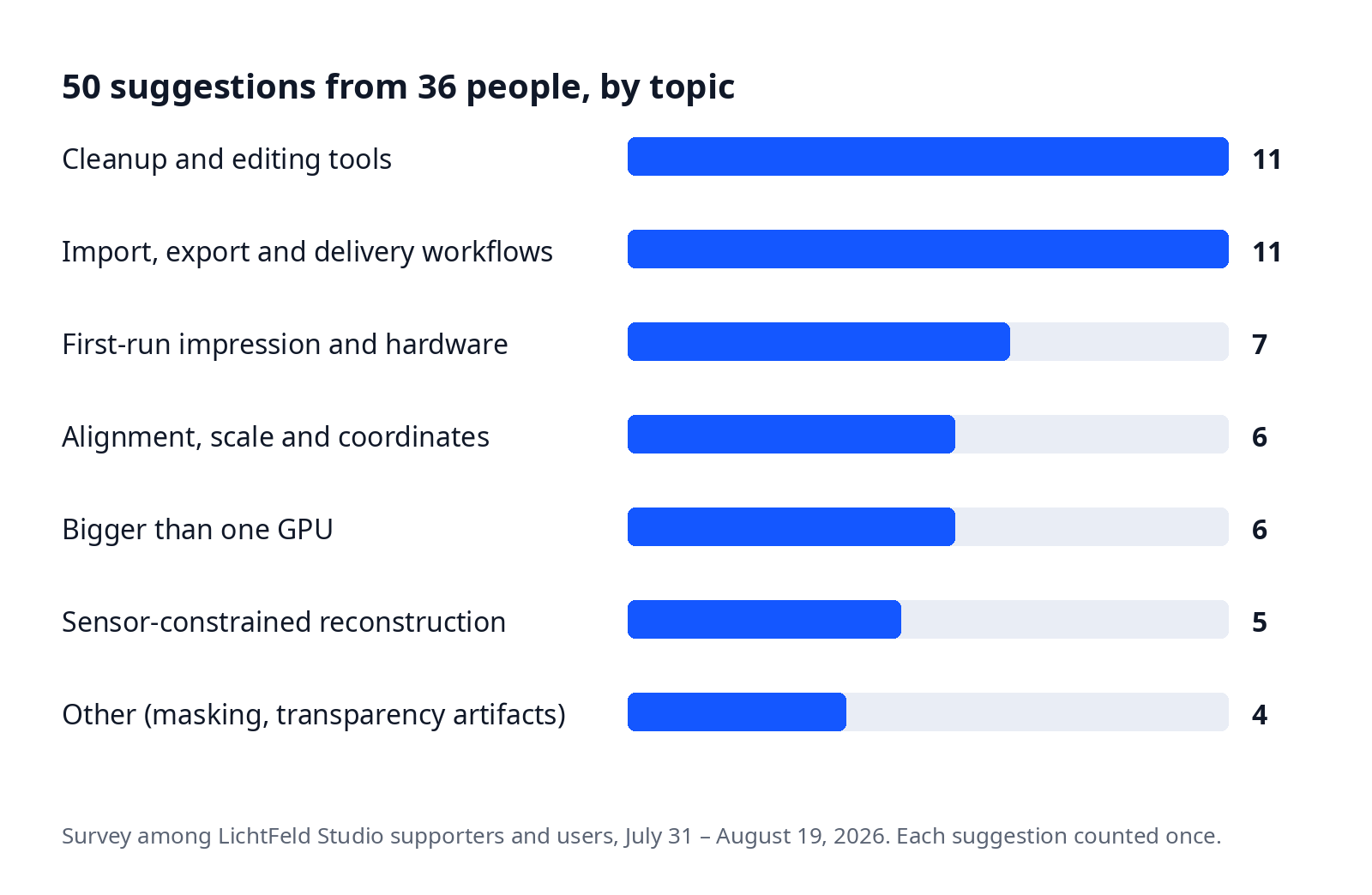
Between July 31 and August 19 we received 50 feature suggestions from 36 people. First of all, thank you to everyone who shared feedback.
It helps us understand where LichtFeld Studio fits into your workflows and pipelines, and it helps us stay focused on what matters most.
We read through all of it and summarized the major topics below.
1. Cleanup and editing tools
This was the largest category. Cleaning a trained splat still takes too much careful manual work.
Some of the requested workflows are already possible today, but the feedback made clear they need to be easier to discover and use.
Many suggestions asked for more advanced selection and editing tools: recoloring, cloning, culling, filling gaps, and most of all easier ways to remove floaters, for example with automated selection.
2. Alignment, scale and coordinates
Every model should come out scaled and aligned correctly. In practice, either during alignment or when importing and exporting to other applications, models often end up the wrong way up. And if they are upright, the scale is off.
This friction came up many times: an easier way to define the up axis, aligning multiple splats, and overlaying real-world coordinates were all mentioned.
3. Sensor-constrained reconstruction
Users want LichtFeld Studio to make better use of the accurate geometry they already have instead of relying only on image-based reconstruction.
There have been several discussions in our Discord about using laser-scanned data to initialize the point cloud for training.
Many devices produce colored point clouds, depth maps, normal maps, or meshes, and these can be a stronger starting point than SfM alone.
The feedback went one step further: this data should not only help with initialization. Using it as a constraint during training could lead to cleaner, more stable splats and less cleanup afterwards. The Tersus lidar above gives us our own data to work on exactly this.
4. Bigger than one GPU
Memory usage and performance are always high on the list, and a lot has already improved in speed and VRAM usage, especially in the upcoming v0.5.4.
But what we read between the lines here is not "make it faster", it is "make it possible". A slow but successful path is better than a hard VRAM wall.
Suggestions range from automated splitting and merging, overflow to system RAM, multi-GPU, to spreading the load across machines.
These are advanced areas, so we will investigate the right path carefully before making promises.
5. Import, export and delivery workflows
LichtFeld Studio needs to fit into the tools, formats, and delivery workflows people already use.
COLMAP is the preferred way to bring training data into LichtFeld Studio, but many other tools and formats deserve attention for easier exchange and preservation of data.
This includes color-space handling, mesh and collider export, synthetic-data import, industry-standard export formats, HTML viewers, and animation paths.
6. First-run impression and hardware
LichtFeld Studio exposes a lot of power, and that can make the first session feel overwhelming. We have always focused on being able to tune every parameter, and the UI has gone through many iterations to get where it is today. But we are not there yet. Making new users comfortable is on our radar. This topic also includes better support for different hardware setups, including non-NVIDIA hardware like Apple devices.
What happens next
One thing stood out: nearly all suggestions focused on the core desktop application. Documentation, the LichtFeld Portal, pricing, and licensing were barely mentioned. That tells us the community is deeply engaged with the day-to-day production workflow inside LichtFeld Studio itself.
We decided there is no need for a poll on which features make it into the next iteration. We have already created the first epics and will work towards a full end-to-end process. Some features will take more iterations until they are stable, like SfM (already in progress behind the curtains). Others are quicker to integrate or improve, like the cleanup workflows.
We will run this survey regularly to stay updated.
Not every suggestion can become a v0.6 feature, but these themes give us a strong direction. The feedback was constructive, practical, and overwhelmingly positive. It is great to see the community around LichtFeld Studio growing, and even better to see what people are already creating with it. That is what drives us to keep improving.